 Awaken
Awaken
build games in your browser.
Awaken is a real-time 3D game engine and editor that runs entirely in your browser. Import assets, build a scene, and ship a playable link, all from a single tab. No install, no login.*
* An account is only needed to buy paid assets or publish your own to the store.
Why Awaken
100% in your browser
It runs on the open web - just a tab. Nothing to download, nothing to keep updated.
Powered by WebGPU
Real-time rendering straight on your GPU - modern lighting and large scenes, drawn live as you edit.
Physics built in
Colliders and rigid bodies with gravity, collisions and bounce - hit Play and your scene reacts in real time.
Fully client-side
Your project never leaves your machine. No uploads, no ads, no tracking cookies. Usage stats switch off in Settings.
Instant, zero setup
No account, no config, no waiting. Load one tab and you're building in seconds.
Free & open
Free to use. Import from Unity, Godot and Unreal, export a self-contained scene.
From assets to a shareable link.
Three steps, one tab. There is no build server and no export queue - the whole loop happens on your machine.
- 1
Import
Drop in a Unity, Godot or Unreal package - or a glTF/OBJ model. Awaken reads it directly, no re-export step.
- 2
Build
Compose the scene, add physics and TypeScript behaviours, and watch it run live on WebGPU as you work.
- 3
Ship
Export one self-contained file and share the link. Anyone opens it in a browser and plays - no install.
Nothing leaves your machine.
Editing, TypeScript compilation, physics, and packaging the final game all run in your browser tab. No account, no build servers, no uploads - your project stays entirely yours, from the first primitive to the exported file.
A real editor, right in the browser.
Scene hierarchy, inspector, gizmos, lighting, physics - the full toolset, rendering live on WebGPU. Drag in a Unity, Godot or Unreal package and Awaken reads it directly.
Open the editor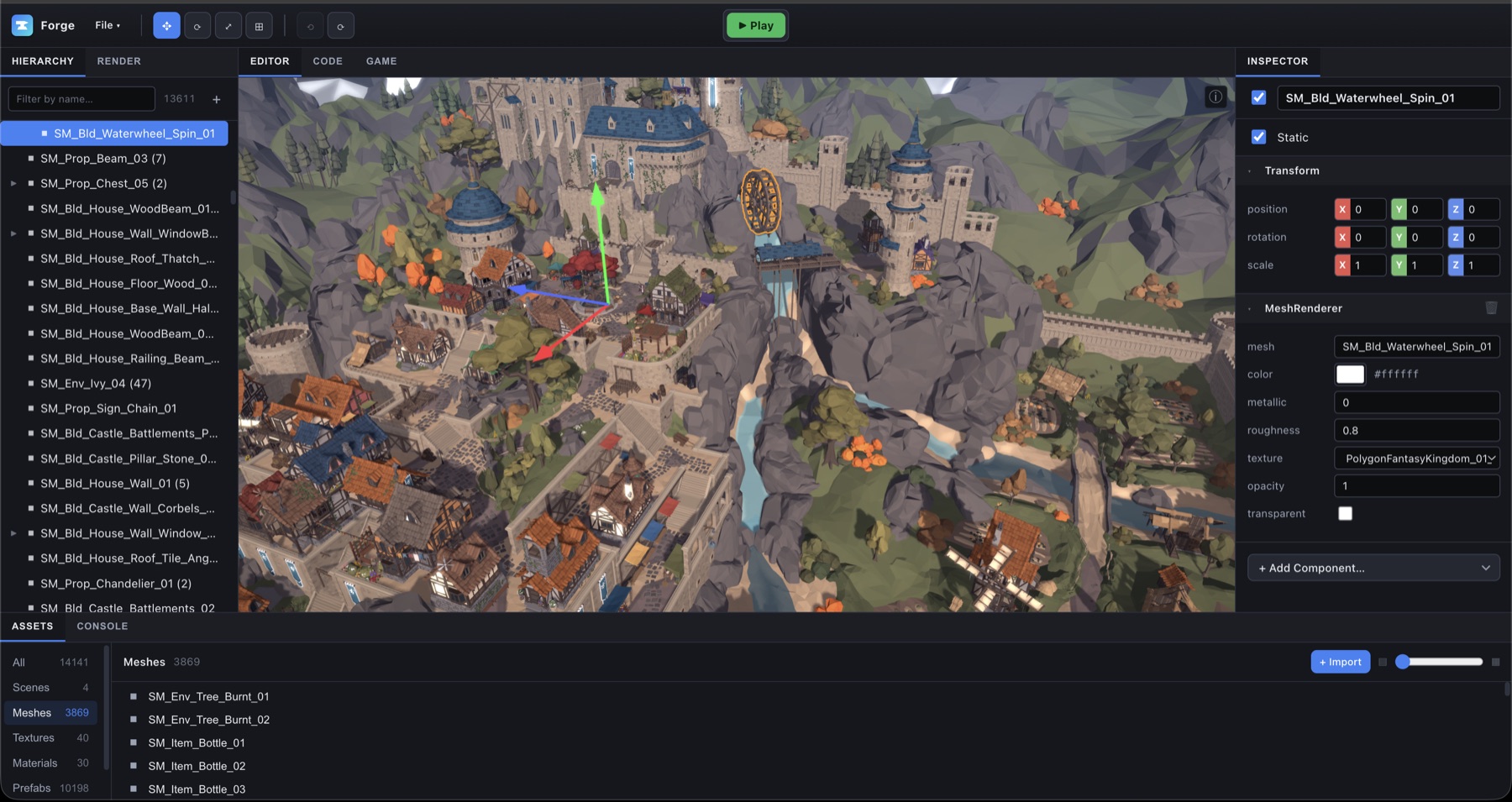 Editor screenshot
Play one right here.
Awaken games are single, self-contained files. Here is one running in the page - the same thing your players get from a link.
Nothing here was placed by hand
The terrain, the caves running under it, the trees, the grass and the seabed are all generated from a single seed as you walk into them. So is the sky: a day and night cycle with a moon that keeps its phase, clouds that drift and thicken, and weather that turns over on its own, from clear to rain to a storm with lightning, then back. Break a block or place one and it stays until you reload.
The whole thing is 1.21 MB
That is one file: the game, its world generator, and the engine that runs it. A photo from a modern phone is often larger. There is nothing to install and nothing to download once it has loaded, because there is no second file to fetch. Send someone and they are playing.
Controls
- WASD
- Move
- Space
- Jump, or swim up under water
- Shift
- Sprint
- Left click
- Break the block under the crosshair
- Right click
- Place the held block
- 1 to 9
- Choose what to hold
- Escape
- Pause: map, sound, view distance, seed
- Double-click the map
- Travel there
A real engine, not a toy.
Everything you need to make and ship a 3D game - and the docs to go deep on each part.
Modern renderer
Forward PBR, cascaded shadows, a Unity-style Volume post-FX stack and GPU-driven culling - all in WGSL.
Learn morePhysics engine
Rapier under the hood: rigid bodies, colliders, a character controller, raycasts and triggers.
Learn moreScripting, two ways
Gameplay ScriptBehaviours and editor tools, both in TypeScript - compiled in your browser (esbuild-wasm), with public fields becoming inspector controls.
Learn moreImport anything
Unity, Godot and Unreal packages plus glTF/OBJ models - meshes, materials, colliders, terrain, skeletal animation, and Unity HUD/UI packs.
Learn moreOne-file export
Ship a single, self-contained game.html - assets inlined and zstd-compressed, double-clickable, no hosting required.
Learn moreA full editor
Docking panels, transform gizmos, hierarchy, inspector, a material editor and a code editor - the whole toolset in a tab.
Learn moreBring your existing project
Drop in an engine package - or a glTF/OBJ model - and Awaken reads it directly, no re-export. Here’s what comes across today.
| Feature | Unity | Godot | Unreal | glTF |
|---|---|---|---|---|
| Meshes & geometry | ✓ | ✓ | ◐ | ✓ |
| Materials & textures | ✓ | ◐ | ◐ | ◐ |
| Scene & transforms | ◐ | ✓ | ◐ | ✓ |
| Skeletons & animation | ◐ | ◐ | – | ✓ |
| Lights | ◐ | ◐ | ◐ | – |
| Cameras | ✓ | ✓ | – | – |
| Colliders & physics | ✓ | ◐ | – | – |
| Terrain | ✓ | – | – | – |
| Sky & post-FX | ✓ | ◐ | ◐ | – |
| Per-instance re-skin | ✓ | ✓ | – | – |
| Prefabs & instances | ✓ | ✓ | – | – |
How it’s built, in the open.
- #24Rebuilding my 2014 game from the only copy leftSchwizzle's source was gone and the last copy of the Mac app would no longer open. How I got it running again, took the binary apart with otool, Ghidra and an emulator, tested my rewrites against the original machine code, and rebuilt the game in the Awaken editor, with the commands and code for each step.
- #23What 'a 3D scene viewed flat' left outPost 18 said 2D cost almost nothing. Three 2D games later the renderer claim still holds, and the HUD is still DOM. The work went into everything around the sprite: UI that lays out the game, one layout per screen shape, shapes that know their own distance, and a physics plane nobody has used yet.
- #22Porting a fluid puzzle twice: once bit for bit, once in the editorUndercurrent's 104 levels were tuned against one chaotic fluid solver. The first port copied it bit for bit, to have an exact reference. The second was built in the editor, gave up bit parity on purpose, and had to earn every level back through the game's own checker.
Found a bug? Want a feature? Tell us.
Email awaken3d@raiblin.com with anything: a bug, a model that imported wrong, a feature your game needs, a question, or what you think of Awaken so far.
- In the editor, an error message has an Email us this error button. It writes the email for you with the editor version, your browser and the error, and you add what you were doing.
- Importing? Say which engine and pack it came from, and attach the file if you can share it.
Start building - it’s free.
No account. No install. Your work stays on your machine.
Launch Editor