
What 'a 3D scene viewed flat' left out
Post 18 ended on a confident line: a 2D game in Awaken is a 3D scene viewed flat, sprites and a 2D camera "cost almost nothing", and there is no second system to design. Since then I have built three 2D games in the editor. Crown Quest is a logic puzzle on a grid. Undercurrent is the fluid puzzle from post 22. Schwizzle is a puzzle game I released in 2014 for iOS, Android and OS X; its source is long gone, so I rebuilt it from the shipped Mac app.
Half of that line held up. There is still no 2D renderer: a sprite is a MeshRenderer on the built-in quad, drawn by the same forward pass as everything else. The HUD is still DOM in all three games. Crown Quest's board is 3D crowns on 3D tiles seen from straight above by an orthographic camera, which is the "3D scene viewed flat" idea taken literally.
What the line left out is everything between drawing a sprite and shipping a game on screens of every shape.
The DOM lays out the game
The first thing all three games needed was for the UI to tell the world where to draw.
api.ui.rect(name) returns where a UI element is drawn, in CSS pixels from the game view's top-left. That is the same space as the pointer and api.screenToWorld, so a script can turn an element's corners into world points. The rect already accounts for the element's anchor, which layout variant is showing, the screen's scale, the safe area and any transform. An element that has not been drawn yet is laid out on the spot, so a script's onStart can frame a camera around UI the designer placed.
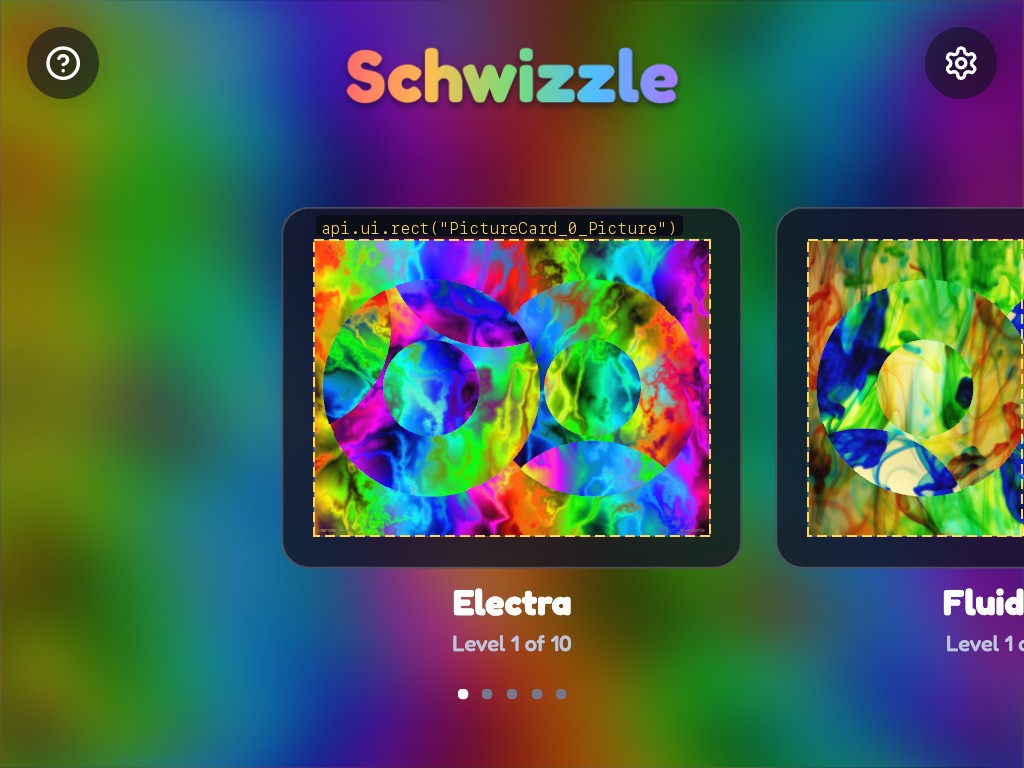
Schwizzle uses this for every board in the game. A board is a BoardView from the game's own script library: spawned from prefabs, then scaled and centred into whatever rectangle it is given. On the home screen each picture card is a UI element, and every frame the menu script asks for each card's rect and places that card's board inside it. Swipe the cards and the boards follow, because the DOM moved the cards and the boards read the new rects.
Crown Quest frames its court the same way. On the title screen, the King's crown sits at the top of an element called TitleCrown, placed under the tagline, and his body fades out over another called TitleFade, so a taller phone gets a bigger portrait. When a colour region is crowned, the gold that flies from the board to its shield starts at the cell, from where the camera drew the board, and ends at the shield, from api.ui.rect.
None of this needed a new UI system. It needed one function that reports what CSS layout already decided.
One game, every screen shape
The problem arrived on a phone. A level laid out for a desktop window was letterboxed on a 2.16:1 screen, with its controls eating into a playfield sized for another shape. The fix came in three generic pieces.
Layout variants. A UI screen can carry a window-size range (minimum and maximum height and aspect). Screens with the same name and different ranges are variants of one screen, and exactly one is shown at any size. When two variants share a limit, the size goes to the variant whose minimum it is. A window in a gap goes to the nearer variant, and an overlap goes to the narrower one. Every api.ui verb (setText, show, hide and the rest) reaches every element with the name, so a script never knows or cares which variant is up. Each screen also has a design size and scales by the smaller of view over design.
Insets. A screen can declare the bands at the edges of the view that its controls hold. The game area is the view minus the safe area and the insets of the screens that are showing.
Camera Fit. An orthographic camera's Fit can be contain, which shows a rectangle orthoSize * 2 high and fitAspect wide, whole and as large as fits inside the game area. It can also be cover, which fills the view and crops the long axis. The player and the editor's Game view pass the view to the camera maths, so the frame and screenToWorld agree.
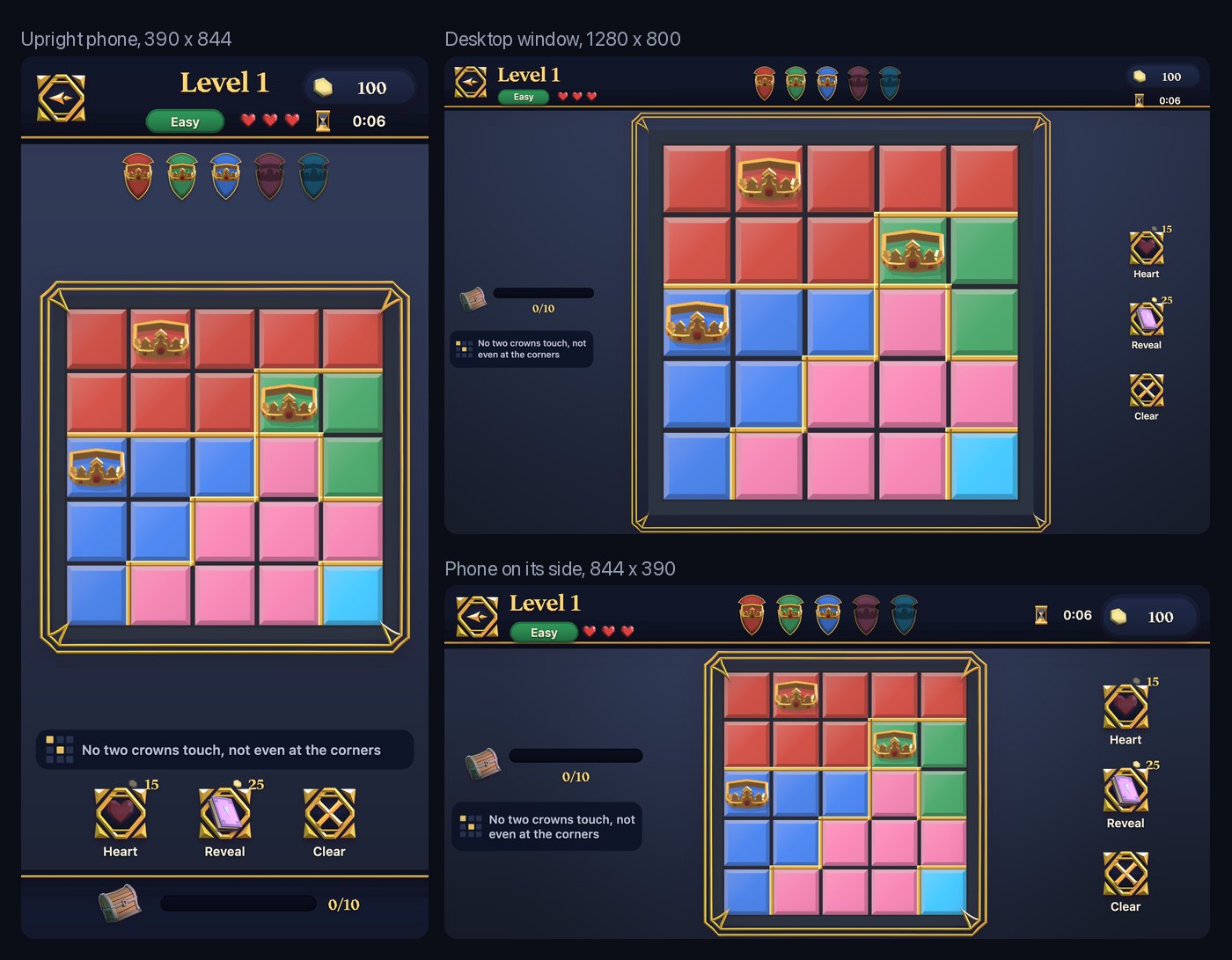
Crown Quest's level screen has four HUD layouts, split by aspect at 0.62, 1 and 1.7. Most other screens have three. The upright phone layout is designed at 390 x 700 and holds 146 px at the top and 204 px at the bottom. The desktop layout, from aspect 1 to 1.7, holds 225 px on the left and 185 px on the right. There is no code in the game that fits the board by hand. The framing script asks the camera where the board landed and places everything else from that.
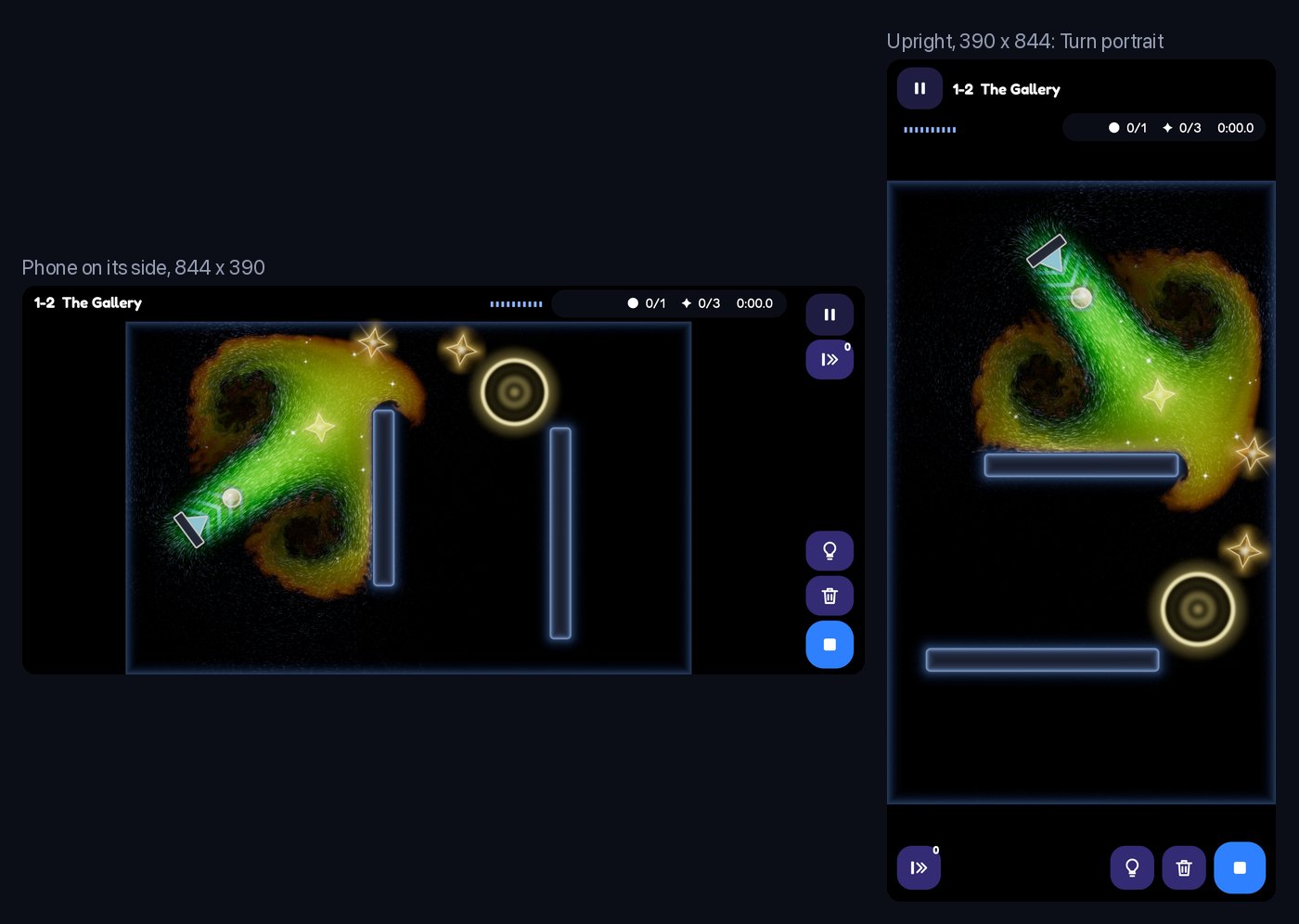
Undercurrent needed one more piece. The original game turns its tank a quarter turn on an upright phone, so the tank takes the whole width. A camera's Turn can now be portrait: in a view taller than it is wide, the picture turns a quarter clockwise. Fit, the insets and screenToWorld all work in the turned view, and pointer input is turned back, so dragging and rotating tools needed no changes in the game's scripts. Undercurrent's HUD has three variants: a big window, a phone on its side, and an upright phone. The iPhone SE, at 667 x 375, was solved with a design height alone. The side-on HUD is designed 390 high, so at 375 it scales by 375/390 instead of overflowing, and with all four tool types in the tray there are 17 px to spare before the hint button.
Shapes that know their own distance
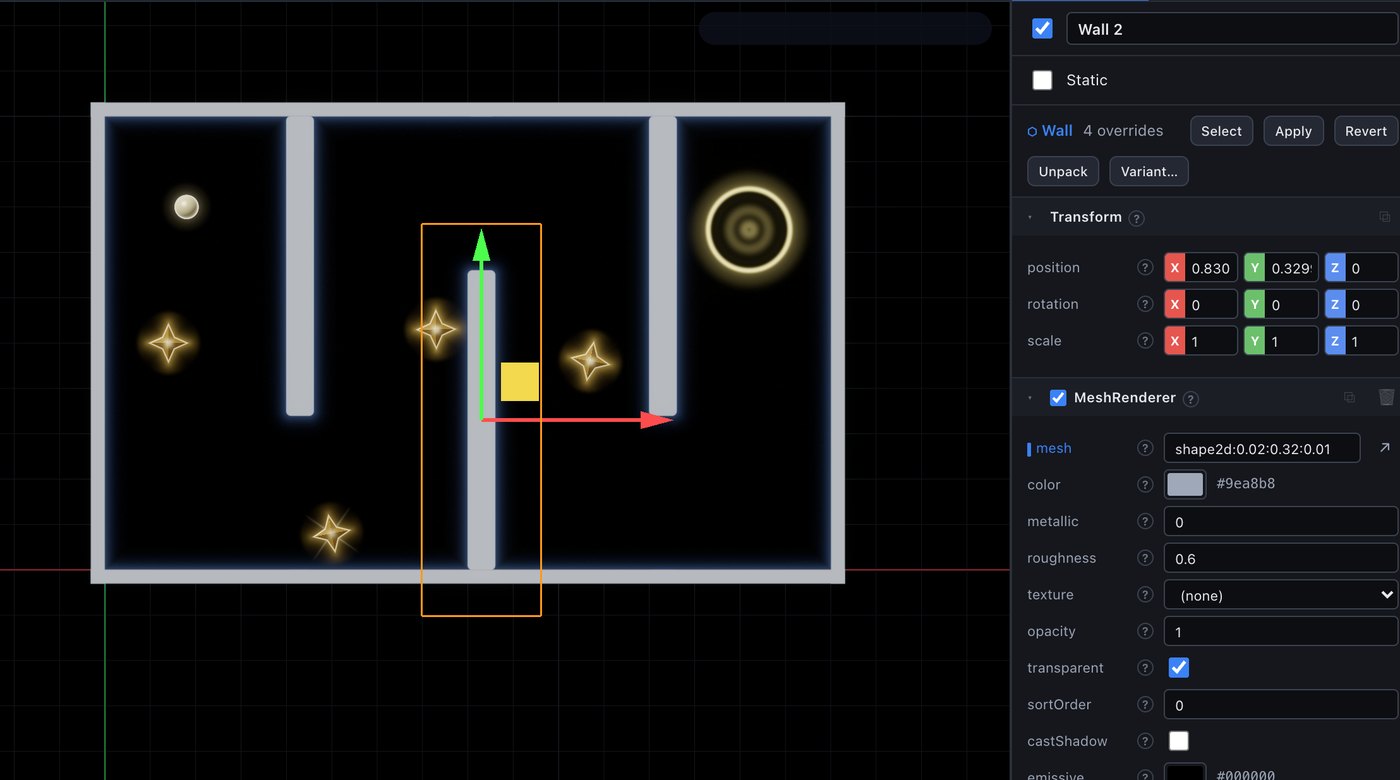
Undercurrent's walls use a new component, Shape 2D: a box with rounded corners, a circle or a capsule, in the object's XY plane.
A Shape 2D draws on a quad it builds for itself, reaching 0.1 units past the shape on every side. The quad's UVs carry the shape's half size, so any shader graph can rebuild the exact signed distance to the shape's edge with a Shape Distance node. The default material, Shape Fill, uses it to draw a soft edge in the object's own colour. One mesh exists per distinct size, named after its numbers: Undercurrent's project holds 204 meshes, and every one of them is a Shape 2D quad.
The distance pays off in the water. A camera can now carry an override material, which it uses to draw every object it sees, and materials gained a min blend. Put those together and a camera draws every shape's signed distance into a float render texture, keeping the smallest value at each texel, which is the union of all the shapes. Create > 2D > Distance Field Camera makes such a camera, cleared to a large distance; you give it a float render texture to draw into.
Undercurrent's Obstacles camera is exactly that: an orthographic camera drawing only the Obstacles layer, with the Shape Distance graph (unlit, min blend) as its override, into a 410 x 256 r16float texture cleared to 4. The Water simulation redraws it every step, before the update graphs that post 22 describes.
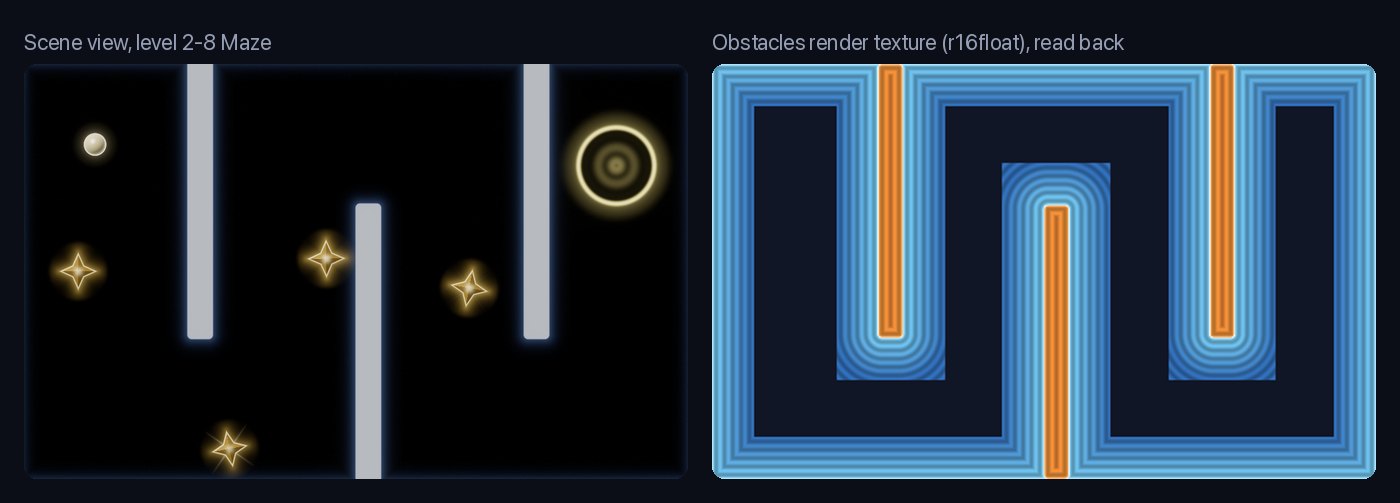
The square ends on the bands around each wall are the quads. Each shape writes distance only as far as its quad reaches, so more than 0.1 units from every wall the field just says "far".
A physics plane nobody has used yet
2D physics went in during the same week. Physics is still Rapier in 3D, held to the plane: with Physics 2D on in Project Settings, dynamic bodies move in X and Y and turn only about Z. A Collider can take its shape from the object's Shape 2D, and gained a collision layer (0 to 15), a mask of the layers it collides with, friction, and one-way.
One-way was the fiddly part. Rapier lets you filter contacts with a hook, but the hook runs while the world steps and may not touch the world itself; Rapier refuses the aliasing. So the engine copies the position of every one-way collider and every moving body before the step, and the hook compares those copies: a body on the collider's local +Y side collides, and one on the other side passes through.
None of the three games uses it. I planned Rapier bodies for Undercurrent's cargo and a one-way collider for its flaps, and ended up stepping the cargo in a script library instead, against the water, the walls and the flaps. Crown Quest and Schwizzle move pieces on a grid in script and need no physics at all, which the 2D docs now say outright. It is built and tested, and it is waiting for a platformer.
The small things a 3D engine never needed
Smaller pieces from the same weeks:
- Sort order. Transparent draws go in ascending
MeshRenderer.sortOrder, so a sprite can sit on top of another at the same depth. - Blend modes. Materials can be alpha, additive or premultiplied, plus the
minabove. Of Undercurrent's 39 shader graphs, 19 are premultiplied (its sprites) and 9 are additive. - A 2D Scene view. An orthographic camera on the XY plane with pan, zoom about the cursor, 2D move, rotate and scale handles, box-select, and snapping to a grid cell you set. It is saved per scene, so a 2D scene opens in 2D.
- Linked prefabs. An instance keeps its link to the prefab, marks its overrides, and can Apply, Revert or Unpack. Apply carries a change to every instance in every scene. Undercurrent has 28 prefabs, nearly all of them one per piece.
- Follow parent for UI. An element can be laid out inside its parent element, so a button's icon and count move and hide with the button.
What is still missing
- World sprites get one texture each: no atlases, no UV sub-rects, and no 9-slice outside the UI.
- A Shape 2D resized by a script keeps its old mesh in an exported game. The editor rebuilds the quad and the player does not, so sizes have to be set in the editor.
- Every size a shape is ever given leaves a mesh asset behind in the project.
- The character controller ignores Shape 2D colliders, collision layers and one-way platforms, raycasts ignore layers, a Shape 2D collider ignores the object's scale, and a contact reports only the other entity, with no normal or impulse.
- Schwizzle has only its 4:3 landscape layout so far, so on an upright phone it shows small.
So was post 18 wrong?
About the renderer, no. None of these features needed a separate 2D draw path. Shape 2D is a mesh and a material, the distance field is a camera and a blend mode, and the portrait turn is a rotation in the camera maths.
About the cost, yes. "Sprites cost almost nothing" was true and beside the point. The cost of a 2D game is in the layout: where the board goes on a phone held either way, how the HUD and the playfield share a screen, and how a script finds the thing a designer placed. In Awaken that work landed in CSS layout and a few fields on a camera, which is an argument for the DOM HUD that post 18 did not know to make.